Banking at a glance
Record money received from customers and paid to vendors, move cash and cheques to the bank with deposit slips, and reconcile your bank statements.
For companies without sap or with sap business one.
Show the steps for
What Banking is for
Use Banking for money that goes through your bank accounts and is not taken at the till:
- a customer pays an invoice by bank transfer or cheque (Incoming Payments),
- you pay a supplier, the rent or the electricity bill (Outgoing Payments),
- cash and cheques taken in the shop are taken to the bank (Deposits),
- the bank's monthly statement is checked against your records (Reconciliation).
Banking is for managers and administrators. Cashiers do not see it.
Every payment and deposit is posted straight to your books in the Finance app: the bank account, the customer or vendor balance and the invoices it pays are all updated at once. Banking needs the Finance app; if Finance is not switched on for your company, Banking shows a message instead of the screens.
Every payment and deposit is posted to SAP Business One first. If SAP refuses it, nothing is saved and you see SAP's message. Bank statements and matching are kept in Voltix and compared with the SAP journal of the bank account.
Banking is not available for companies that use QuickBooks yet. The Banking screen shows a message saying so.
The Banking screen
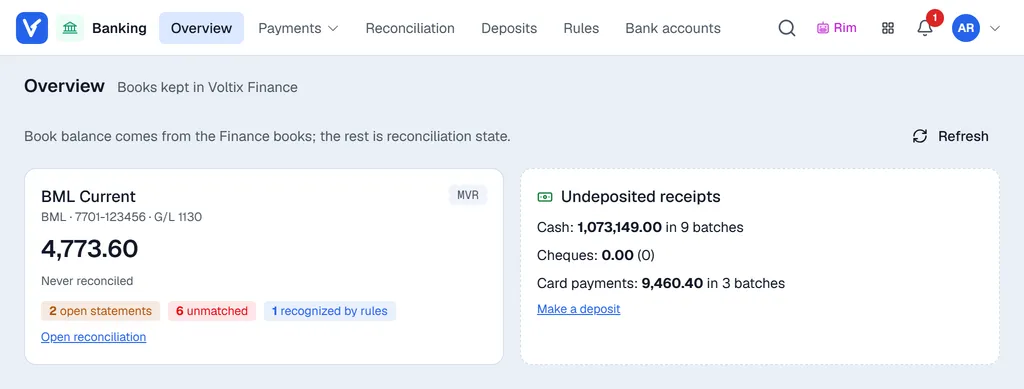
| Tab | What you do there |
|---|---|
| Overview | See each bank account's book balance, when it was last reconciled, open statements and unmatched lines, and the cash, cheques and card payments not yet deposited. |
| Incoming Payments | Record money received. See Incoming payments. |
| Outgoing Payments | Record money paid out. See Outgoing payments. |
| Reconciliation | Enter or import bank statements and match them. See Reconcile a bank statement. |
| Deposits | Make deposit slips for cash, cheques and card payments. See Deposits. |
| Rules | Teach Banking to recognise regular statement lines. See Rules. |
| Bank Accounts | Your company's bank accounts. See Bank accounts. |
Where to start
- 1Check your bank accounts on the Bank Accounts tab.
- 2Set the reconciliation defaults. See Setting up Banking.
- 3Record your first payment, or open the latest statement and start matching.