Inventory reports
Print or download stock on hand, stock movements in a period, and price lists side by side.
Show the steps for
Open Inventory → Reports. The reports are for managers and administrators.
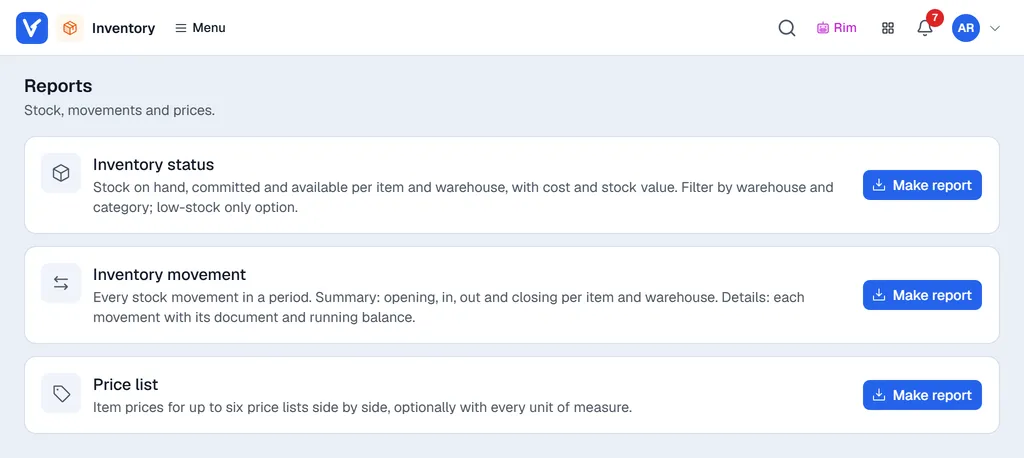
| Report | What it shows |
|---|---|
| Inventory status | Stock on hand, committed and available per item and warehouse, with cost and stock value. |
| Inventory movement | Every stock movement in a period. Summary gives opening, in, out and closing per item and warehouse; Details lists each movement with its document and a running balance. |
| Price list | Item prices for up to six price lists side by side. |
Run a report
- 1Click Make report on the report.
- 2Choose the options: - Warehouses (use All / None to tick quickly), a Category and an Item (name, code or barcode). - Inventory status: Include items with zero stock, Low stock only (at or below minimum). - Inventory movement: the Period (one date range, from – to) and the Report type (Summary or Details). - Price list: the Price lists (up to six), Include every unit of measure, Only items with a price. - Inventory status and Price list: Include inactive items if you need them.
- 3Click Excel or CSV to download a sheet, Preview to see the PDF, Print, or Download for the PDF.
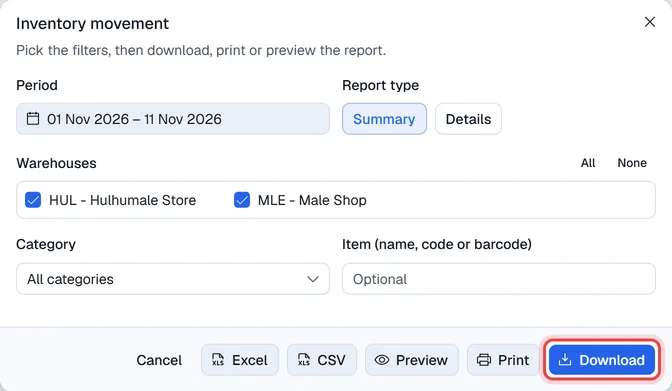
Only the warehouses that are visible in Reports for you are offered (see Setting up Inventory).
Stock is read live from SAP, so a large catalogue can take a little while. Movements come from SAP's warehouse journal and include every document posted in SAP, not only those made in Voltix.
Movements come from the stock movements recorded in Voltix by sales, purchases, transfers and goods issues.