Schedule and reports
See which rentals are on which day, and how much rentals brought in.
Schedule
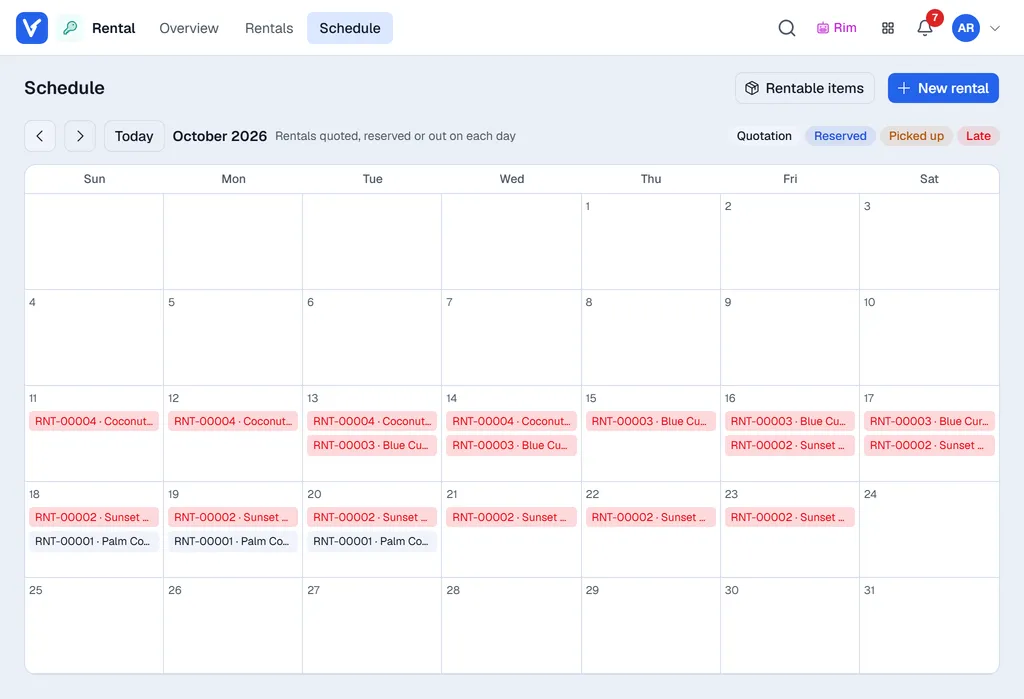
Schedule (top bar) is a month calendar. Each day lists the rentals that are quoted, reserved or out on that day (up to three, then + more). The colours match the labels at the top right: grey quotation, blue reserved, amber picked up, red late. Click one to open it. Use the arrows and Today to move between months. On a phone the days with rentals are shown as a list.
Overview
Overview shows figures for the Period you pick (this month to start with). Click a figure to open the rentals behind it.
| Figure | Meaning |
|---|---|
| Rental revenue | The rental total (before tax) of rentals created in the period, cancelled ones left out. |
| Late fees | Late fees charged, and how many rentals came back late. |
| Out right now | Rentals picked up and not yet returned, and how many are overdue. |
| Deposits held | Deposits on rentals that are out right now, less any refunds. |
Top rented items ranks the items by rental value in the period. To do lists what needs you: late rentals, pickups today, returns due today, rentals not invoiced yet and quotations waiting to be reserved.