Company details
Your company's name, tax numbers, currency, timezone, contact details, logo, and how dates and numbers appear on screen.
Open the page
Open Settings → Company. The page has the cards Company, Contact, Logo and Formats. The screenshot on How Settings is organised shows it.
Company
| Field | What it is for |
|---|---|
| Company name | Printed on documents. Required. |
| GST number | Your GST registration number, printed on tax invoices. |
| Tax ID | Another tax number, if you have one. |
| Default currency | Your base currency, for example MVR. All amounts are kept in it. Required. |
| Timezone | Decides which day a sale belongs to in reports, and the dates on documents, for example Indian/Maldives. |
Contact
Address, Phone, E-mail and Website are shown on documents and used when you e-mail customers.
Logo
Click Upload a logo and choose a PNG, JPG or GIF of up to 2 MB. The logo appears on printed documents and customer screens. Use Replace or Remove to change it.
Formats
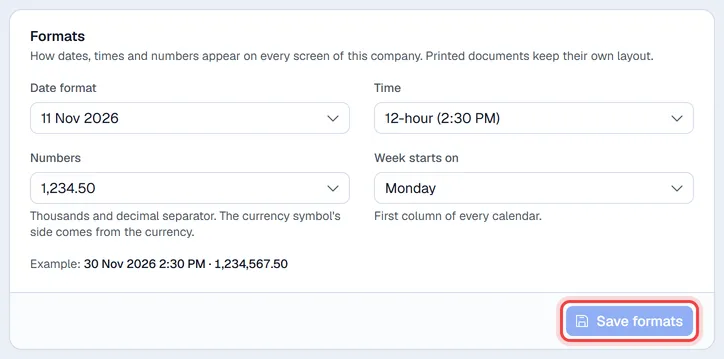
Formats decides how this company shows dates, times and numbers, for everyone who works in it: on every screen and on everything it prints, downloads or sends (invoices, receipts, reports, labels, Excel files). It has its own Save formats button.
| Field | Choices |
|---|---|
| Date format | 11 Nov 2026, 30/11/2026 (day first), 11/30/2026 (month first), 2026-11-11 or 30.11.2026 |
| Time | 12-hour (2:30 PM) or 24-hour (14:30) |
| Numbers | The thousands and decimal separators: 1,234.50, 1.234,50, 1 234.50 or 1 234,50 |
| Week starts on | Monday, Sunday or Saturday: the first column of every calendar |
The example under the fields shows a date, a time and an amount the way they will look. After saving, lists, documents and reports use the new formats at once. Where the currency symbol goes (before or after the amount) comes from the currency itself. Totals keep 2 decimals and unit prices up to 4.
Save
While you have unsaved edits, the header shows Unsaved changes. Click Save changes at the top right to save them (the Formats card saves with its own button).