Units of measure and prices
Sell a product by the piece, the pack or the case, each with its own price, and keep separate prices per price list.
Show the steps for
With SAP Business One, units of measure come from SAP and cannot be changed in Voltix. Prices on a price list can be changed in Settings → Inventory → Price lists and are sent to SAP first; see Setting up Inventory.
The base unit and other units
Every product has a base unit, usually one piece. Stock is always counted in the base unit. Other units, such as a pack of 6 or a case of 24, say how many base units they hold. When you sell or transfer one case of 24, stock goes down by 24.
Add packs and cases to a product
- 1In Inventory, open the … menu on the product row and choose Units of measure.
- 2Click Add a unit.
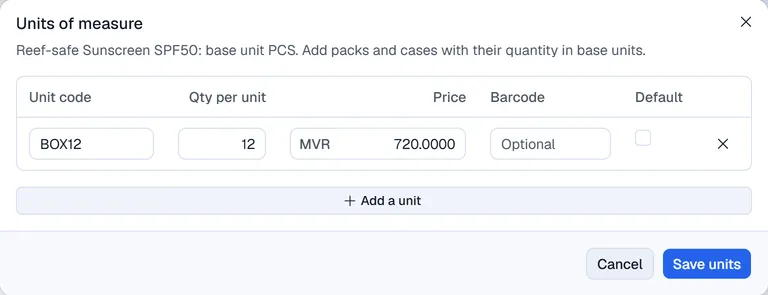
- 3Fill in the row: - Unit code, for example PACK6 or BOX12. - Qty per unit: how many base units the unit holds. - Price for one of this unit. - Barcode for this unit (optional). - Default: the unit offered first.
- 4Click Save units.
Use a unit of measure group
If you set up groups in Settings → Inventory → Units of measure, choose one under Start from a unit group. It replaces the rows with the group's units and fills each price as the base price times the quantity. Check the prices and click Save units.
Prices per price list
The product's own price is the base price. Price lists hold other prices for the same product, for example for resorts or wholesale customers. Prices on a price list are changed in Settings → Inventory → Price lists: click the list, type the Price list price for each product (or use Bulk action to raise or lower them by a percentage) and click Save changes. See Setting up Inventory.
Unit prices can have up to four decimals.