Skills and resume
Record each person's work history, education, skills with levels and certifications, and see who can do what in the Skills inventory.
Set up skill types
In Settings → Employees → Skills:
- 1Type a name under New skill type, for example "Languages", and click Add.
- 2Click the skill type to open it.
- 3Under Skills, add each skill, for example Dhivehi and English.
- 4Under Levels (with progress %), add each level with a percentage, for example Basic 30, Good 70, Fluent 100.
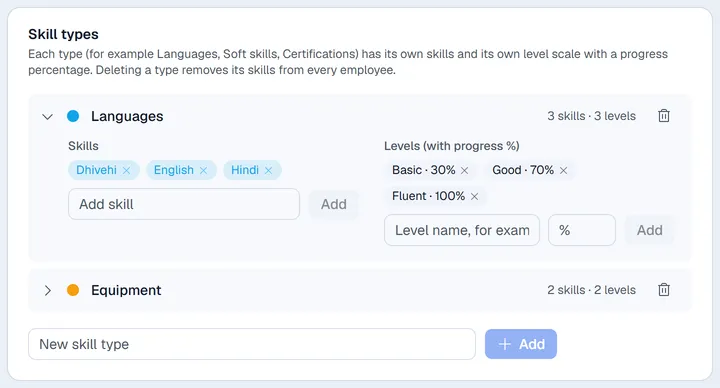
Careful. Deleting a skill type removes it and its skills from every employee.
Fill in an employee's resume
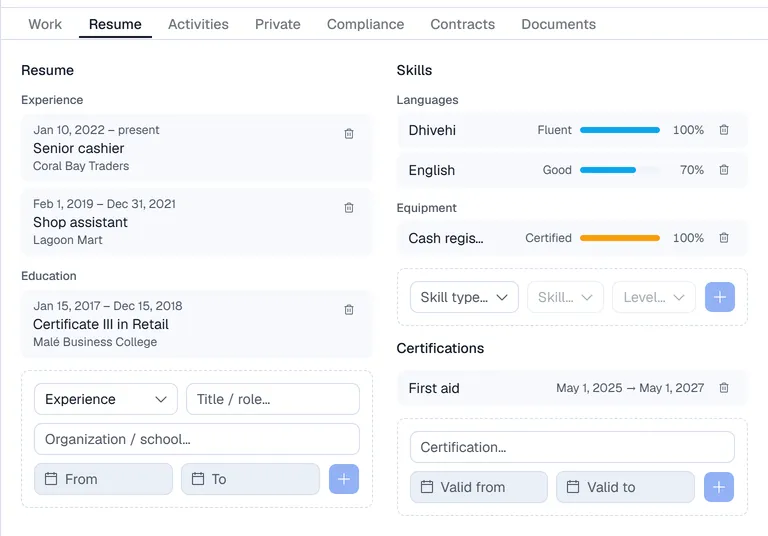
Open the employee and choose Resume.
- Resume: choose Experience, Education or Other, type the title and the organisation, enter the dates (leave the end date empty for "present") and click +.
- Skills: choose the skill type, the skill and the level, then click +.
- Certifications: type the name and the valid-from and valid-to dates, then click +.
Use the bin on a line to remove it. Lines are saved straight away; this tab has no Save button.
Skills inventory
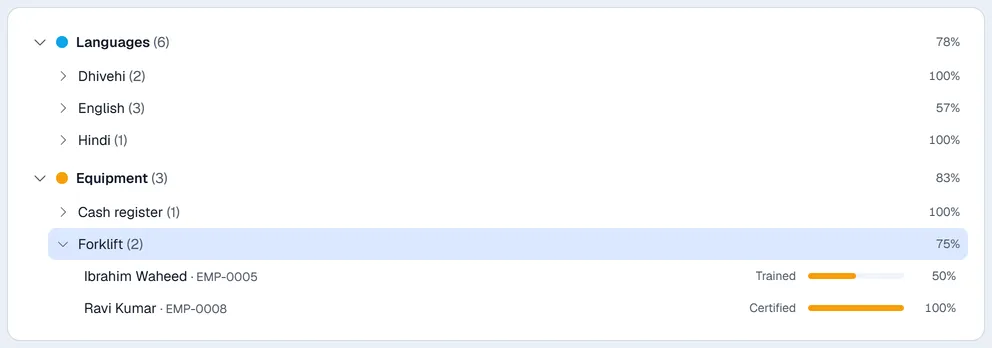
The Skills menu at the top of the Employees app groups everyone's skills by type. The percentage is the average level. Open a skill to see each person and their level; click a name to open the record.