Activities
Plan calls, meetings and to-dos on each deal and work through your list.
Schedule an activity
- 1Open an opportunity or lead and click the Activities tab.
- 2Click Schedule an activity.
- 3Pick the Type and the Due date, write What to do and click Schedule.
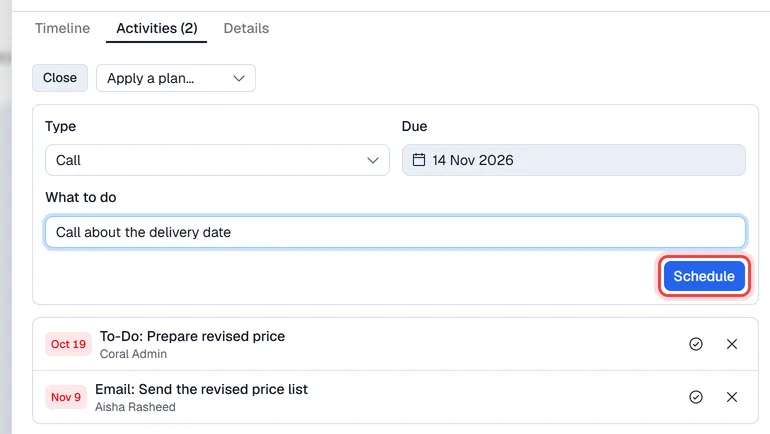
The activity is assigned to you. The card in the pipeline shows the date of its next activity: green when it is ahead, amber when it is due today, red when it is overdue.
To schedule several follow-ups in one go, choose a plan in Apply a plan…. Each step is due its number of days from today. Plans are set up in Settings → CRM.
Finish or cancel an activity
On the opportunity, click the tick to mark an activity done, or the cross to cancel it. Finished activities stay listed, crossed out.
My activities
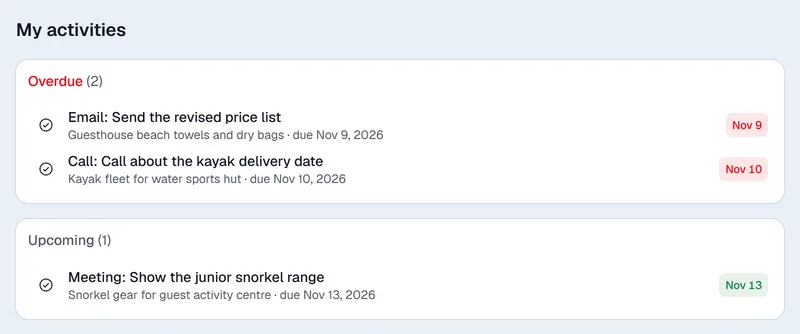
The My activities menu lists everything planned for you, in three groups: Overdue, Today and Upcoming.
Automatic reminders
When Expiry reminders is on, Voltix plans a follow-up for the card's owner a few days before a quotation expires. See Quotations and the pipeline.