Cash in and out, and closing
Record cash taken out of or put into the drawer, and close the register at the end of the shift.
Both actions are in your menu: click your initials at the top right of the POS.
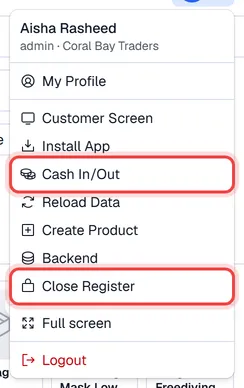
Cash in and out
Use this whenever cash leaves or enters the drawer without a sale: buying supplies from the till, topping up the float, handing cash to the office.
- 1Open your menu and click Cash In/Out.
- 2Click Cash in or Cash out.
- 3Enter the Amount and the Reason.
- 4Click Record cash in (or Record cash out).
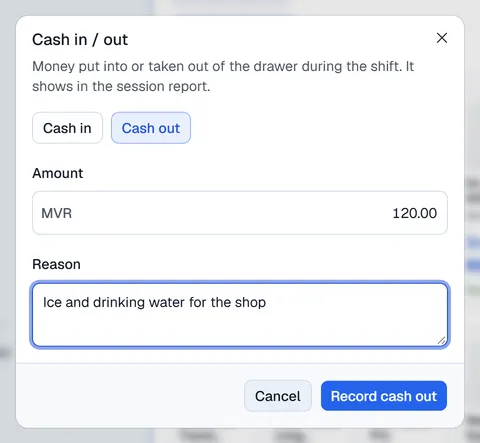
Each entry counts towards the cash you are expected to have at closing and is listed, with its reason, on the session report.
Close the register
- 1Open your menu and click Close Register. Close the register opens.
- 2Check the summary. The Cash card shows the opening cash, cash payments, cash in and out, the Expected cash, what you Counted and the Difference. The Sales card shows the sales, the number of transactions, the sales per payment method and the Received payments taken in Receive payments.
- 3Count the cash in the drawer and enter it under Cash counted in the drawer. Click Count notes to count note by note instead.
- 4Optionally enter Petty cash you keep in hand. It is for information only and is not part of the till totals.
- 5Optionally add a Closing note.
- 6Click Close Register.
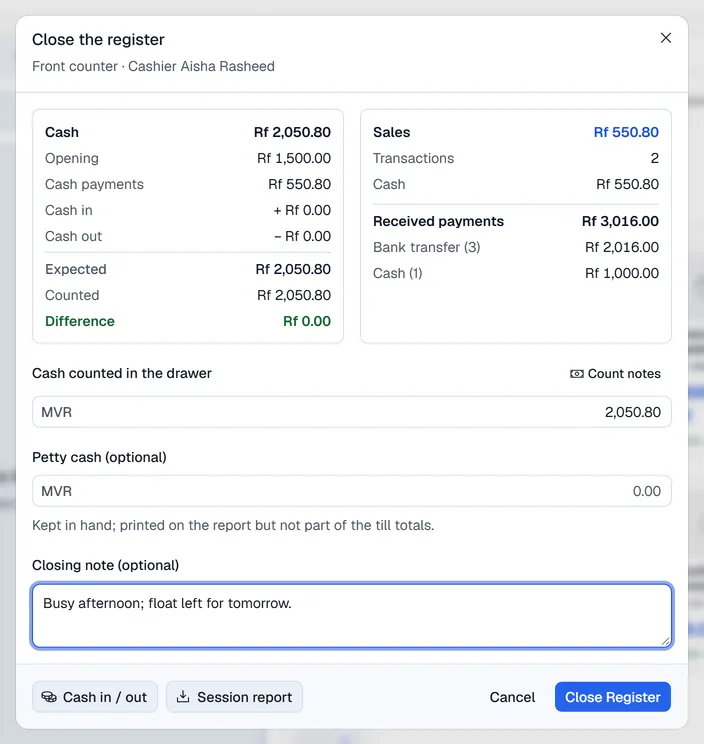
Expected cash = opening cash + cash payments + cash in − cash out.
If your count does not match, Voltix shows The cash does not match with Short by or Over by and the amount. Click Count again, or Close anyway to close with the difference recorded.
When the register closes, the session report PDF is downloaded automatically. You can also download it beforehand with Session report, and record a last cash movement with Cash in / out at the bottom of the dialog. To get it again later, see POS reports.