Set up Subscriptions
Settings → Subscriptions holds the numbering, when invoices are made, and how unpaid invoices are followed up.
Show the steps for
Open Settings → Subscriptions (managers can also click Settings in the Subscriptions menu bar). Managers and administrators can change it; click Save settings (at the foot of each card) when you are done.
Numbering and start
| Setting | What it does |
|---|---|
| Number prefix and Next number | How subscriptions are numbered, for example SUB-00001. |
| How subscriptions start | Directly or from a quotation, Directly in Subscriptions only, or From a quotation only. This decides what the New button offers on the Subscriptions list. |
Invoicing
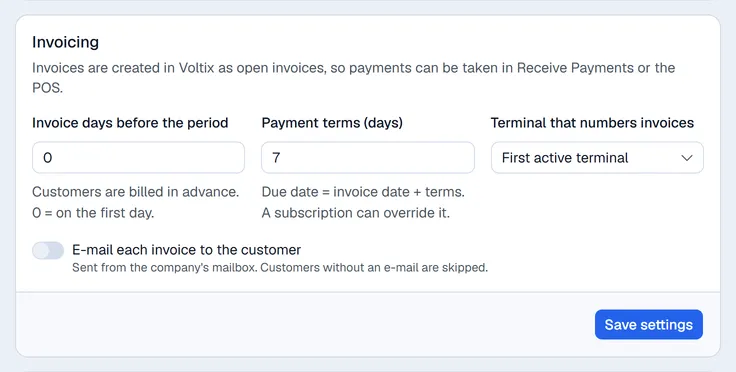
| Setting | What it does |
|---|---|
| Invoice days before the period | Customers are billed in advance. 0 makes the invoice on the first day of the period; 5 makes it five days before. |
| Payment terms (days) | Due date = invoice date + these days. Each subscription can use its own terms instead. |
| E-mail each invoice to the customer | Sends every new invoice by e-mail from the company's mailbox. Customers without an e-mail are skipped. |
Terminal that numbers invoices chooses which terminal's invoice numbering the subscription invoices use. Left on First active terminal, the first active terminal is used.
Terminal that numbers invoices chooses which terminal's invoice numbering the subscription invoices use. Left on First active terminal, the first active terminal is used.
Collections
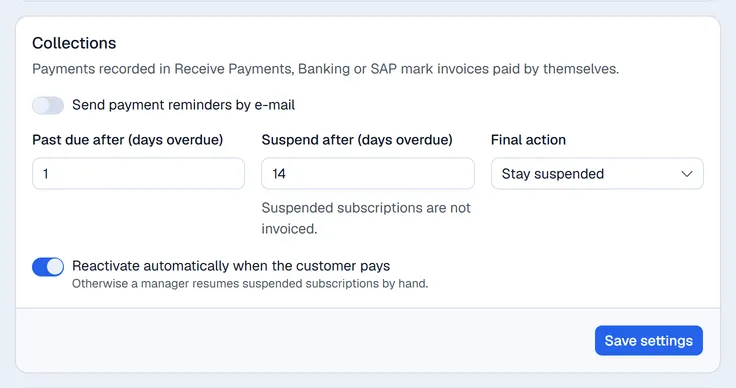
Payments recorded in Receive Payments or Banking mark invoices paid automatically.
| Setting | What it does |
|---|---|
| Send payment reminders by e-mail | Turns on reminders. Then set Reminder days before the due date and Repeat overdue reminders every (days). |
| Past due after (days overdue) | When an invoice is this many days past its due date, the subscription becomes past due. It is still invoiced. |
| Suspend after (days overdue) | At this many days the subscription is suspended. Suspended subscriptions are not invoiced. |
| Final action | Stay suspended, or Cancel the subscription after the number of days you enter in Cancel after (days overdue). |
| Reactivate automatically when the customer pays | A suspended subscription becomes active again once it is paid up. Otherwise a manager clicks Reactivate on it. |
A past-due subscription always returns to active by itself when the customer pays.
Close reasons
Under Close reasons, add the reasons you choose from when a subscription is cancelled (for example Too expensive). Click a reason to turn it off, or on again.