Sales orders
A sales order records what the customer has confirmed and what you still have to deliver and invoice.
Show the steps for
Create a sales order
There are two ways:
- From a quotation. Open the quotation and click Make sales order. The customer, lines and discounts are copied.
- Directly. Click New → Sales order and fill it in exactly like a quotation (see Create a quotation).
Check the lines and click Create sales order.
The sales order is sent to SAP Business One as a sales order first, and gets its SAP number. If SAP refuses it, it stays a draft and SAP's message is shown.
The sales order is saved in Voltix with the next sales-order number from your profile.
The sales order is saved in Voltix. Sales orders are not sent to QuickBooks; the invoice you make from it will be.
Follow up an open order
Open the order from Sales → Sales orders. The To deliver filter lists the open orders that still have something to deliver. At the top of the order, badges show whether it is Open and whether it is Part delivered or Delivered. The Deliveries tab lists every delivery note made against it.
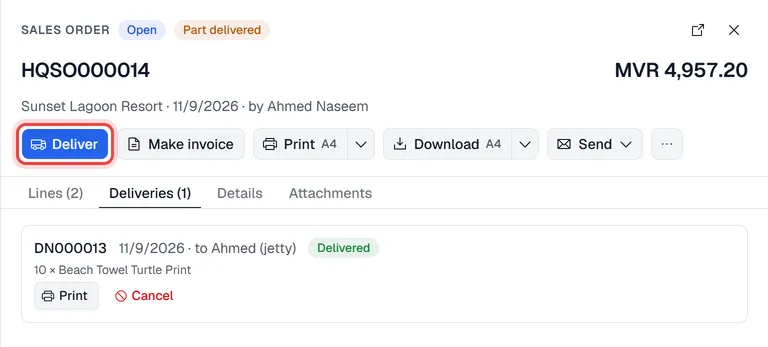
From the order you can:
- Deliver the goods and print a delivery note (see Delivery notes).
- Make invoice to invoice the order (see Invoice a customer).
- Print, Download or Send the order confirmation by e-mail (see Print and e-mail documents).
Change a sales order
- The whole order. While the order is Open, nothing has been delivered on it yet and it is not in SAP Business One, click Edit. Change the lines, prices or details and click Update sales order; it keeps its number.
- Only the reference or the salesperson. At any time, click … → Edit PO # and sales employee. This needs the Edit document fields permission.
A sales order that is already in SAP Business One cannot be edited in Voltix: cancel it and make a new one. The PO number and sales employee can still be changed; SAP is updated first.
Where the order came from
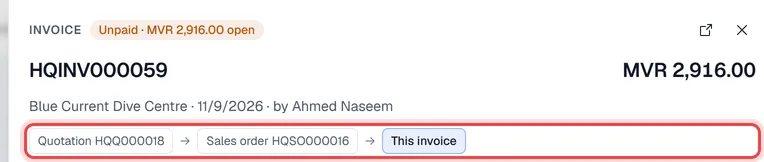
The chips under the customer name show the whole chain: the quotation the order was made from, this order, and the invoices made from it. Click a chip to open that document.