Start a subscription
Give a plan to a customer, choose the currency and dates, and activate it.
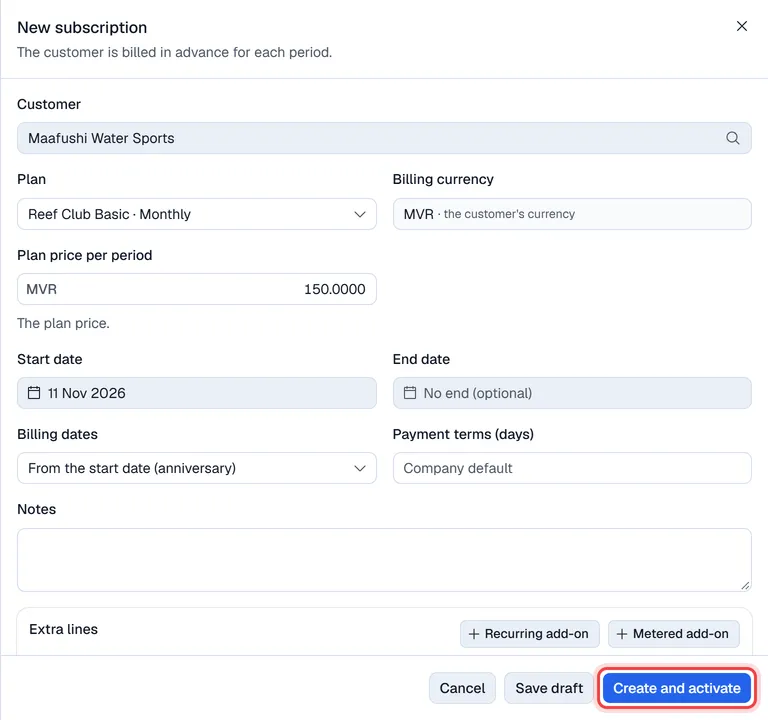
Create a subscription
- 1Open Subscriptions and click New, then Subscription. (When your company only starts subscriptions one way, the button says New subscription or From a quotation.)
- 2Choose the Customer: click the box and type to search.
- 3Choose the Plan. The Plan price per period fills in by itself; you can change it for this customer.
- 4For a per-unit plan, set the Quantity (units).
- 5Set the Start date, and an End date only for a fixed term.
- 6Choose the Billing dates: - From the start date (anniversary): a subscription started on the 14th bills on the 14th. - Calendar (1st of the month / quarter / year): bills on the 1st. Switch on Prorate the first partial period to charge only part of the first period.
- 7Leave Payment terms (days) empty to use the company default, or enter a number of days.
- 8Optionally add Extra lines (see below).
- 9Click Create and activate, or Save draft to finish it later.
The new subscription opens in a panel on the right. A draft is not invoiced: open it and click Activate when it is ready, or remove it with … → Delete draft.
If the plan has a free trial, the subscription starts in Trial and the first invoice is made when the trial ends.
Extra lines
- Recurring add-on: an extra amount billed every period, for example two sets of towels.
- Metered add-on: a price per unit of usage, with a number of units Included per invoice free. You record the usage during the period and it is billed on the next invoice.
Click Remove under a line to take it off again.
Currency
The Billing currency follows the customer:
- A customer with a fixed currency is always billed in that currency.
- A customer set to all currencies can be billed in any of your company's currencies, when multi-currency sales are on.
The plan price in that currency is the plan's fixed price for that currency, if it has one. Otherwise the MVR price is converted at the day's exchange rate, and you can change it. If there is no rate for the currency, add one in Settings or give the plan a price in that currency.
From a quotation
When your company allows it, click New, then Subscription from a quotation, and pick a quotation instead of a customer. Its lines become recurring lines at their quoted prices, and the subscription bills in the quotation's currency. Choose a plan with a zero price when the quotation holds all the pricing.