Receive goods
When a delivery arrives, record it as a goods receipt PO (GRPO). Copy the lines from the purchase order, change the quantities to what really arrived, and post the receipt.
Show the steps for
Copy the lines from the purchase order
- 1Open Purchasing → Goods receipts and click New goods receipt.
- 2Check the Receiving warehouse. The whole receipt goes into this one warehouse.
- 3Click Copy from purchase order at the top right.
- 4Pick the purchase order. The list shows the open purchase orders that still have goods to receive in that warehouse.
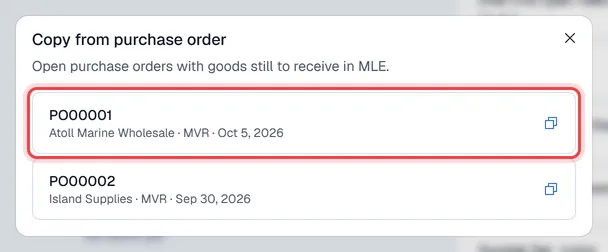
The vendor, currency and every line that is still open are copied, with the open quantity. Under each item you see open and the quantity still to receive.
Check what really arrived
- 1Change each Quantity to what was delivered. Remove the lines for goods that did not come.
- 2Enter the vendor's delivery note number in Vendor ref. no.
- 3Click Post receipt.
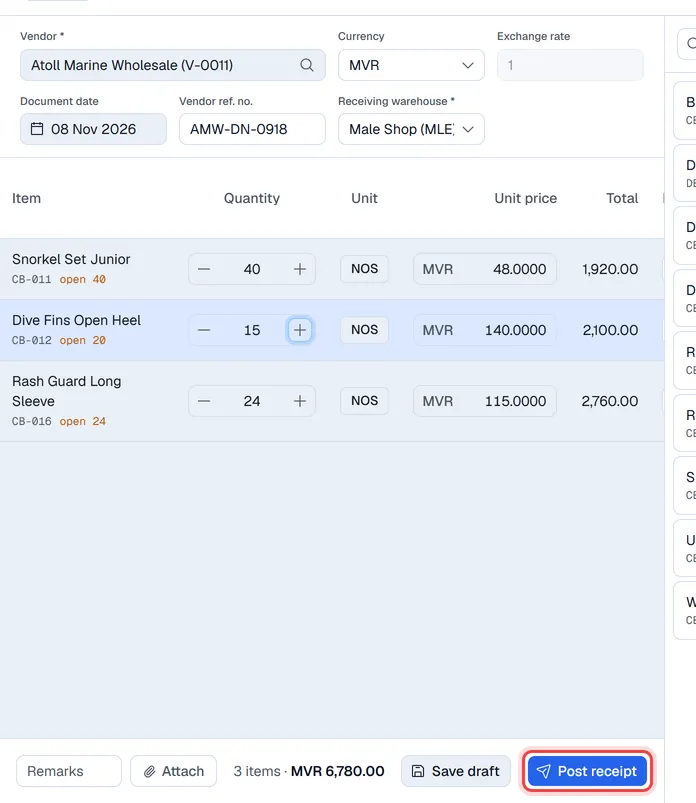
The quantities you receive are counted on the purchase order. Receive the rest later with another goods receipt; the purchase order changes to Closed once everything has arrived.
Posting the receipt adds the stock to the receiving warehouse straight away.
The receipt is sent to SAP Business One first, linked to the SAP purchase order. SAP adds the stock, and Voltix picks it up with the next stock sync. If SAP refuses the receipt, nothing is saved and you see SAP's message.
Batches and serial numbers
If your company tracks batches or serial numbers, items that need them show a button in the Batch/Serial column. Enter the batch numbers (with expiry date if you have one) or the serial numbers for the full quantity before you post. A goods receipt or AP invoice cannot be posted until every such item is complete. On a purchase order they are optional.
When approval is required
If your company requires approval for goods receipts, the button says Submit for approval. The stock is only added, and the quantities only count on the purchase order, once a manager approves it. See Approvals.