Blog, recipes and languages
Write blog posts and recipes, and translate pages into up to four more languages.
Write a post or recipe
- 1Open Blog in the menu at the top.
- 2Pick Blog post or Recipe, type the title and click New post (or New recipe).
- 3The post opens in the page editor. Write it with blocks like any page (see Edit pages).
- 4Click Page & SEO (the dialog is called Post & SEO or Recipe & SEO) for the post details: Type, Author (optional), Summary (shown in lists and under the title), Cover picture and Tags (comma separated, up to 8). A recipe also has Prep (minutes), Cook (minutes), Serves, Ingredients (one per line) and Method (one step per line); it shows as a recipe card and search engines read it as a recipe.
- 5Publish it (see Preview, SEO and publish).
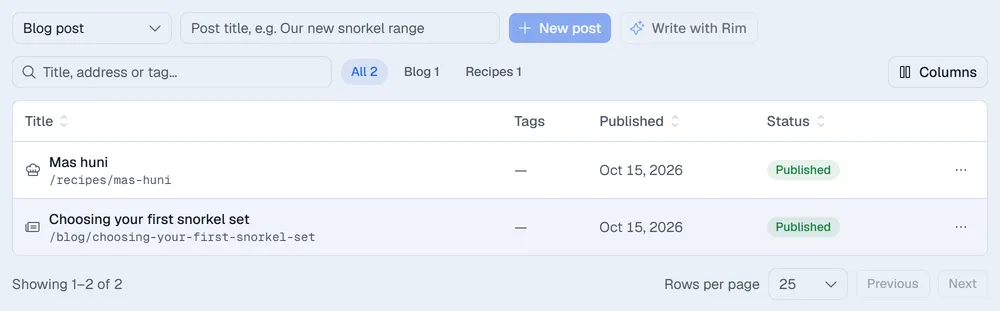
Posts live at /blog/… and recipes at /recipes/…. Use All, Blog and Recipes to filter the list. Add the Latest posts block to a page to show the newest posts there.
Tip. When Rim is set up for your company, Write with Rim drafts a post or recipe from a short brief. Rim only writes a draft; read it and publish it yourself.
Add languages
You need the Websites: settings permission.
- 1In Site settings → General, under Languages, tick up to four extra languages (for example Dhivehi) and click Save.
- 2In Pages, open the … menu of a page and choose Translate, pick the Language and click Create translation.
The translation is a draft page at /dv/… (the language code, then the page address), linked to the original for the language switcher in the header and for search engines. Replace its text and publish it. Right-to-left languages such as Dhivehi are mirrored automatically.
When Rim is set up, you can tick Let Rim translate the text. Ask a fluent speaker to read the translation before you publish.
Each language can have its own menus (see Menus and theme).