Domains and analytics
Move the website from its test address to its Voltix address or your own domain, and see how many people visit.
Addresses of a website
| Address | When it works |
|---|---|
| Test address (/sites/…) | Always, hidden from search engines. |
| Voltix address (your-name. followed by the Voltix site domain) | Shown in Site settings → General → Domains when it is available. |
| Your own domain (for example www.yourshop.mv) | Once you have proved you own it. |
Search engines only index the website on its Voltix address or your own domain, and only once the website's Status is Live (in Site settings → General).
Connect your own domain
You need the Websites: settings permission and access to your domain provider's DNS settings.
- 1Open Site settings → General. In Domains, type the domain (for example www.yourshop.mv) and click Connect a domain.
- 2At your domain provider, add the TXT record shown: named _voltix. followed by your domain, with the value that starts with voltix-verify=. The copy buttons copy each value.
- 3Add the CNAME record shown, pointing your domain to the Voltix address given. For a bare domain without www, use your provider's ALIAS/ANAME record or redirect it to www.
- 4Click Check DNS. DNS changes can take up to an hour to appear.
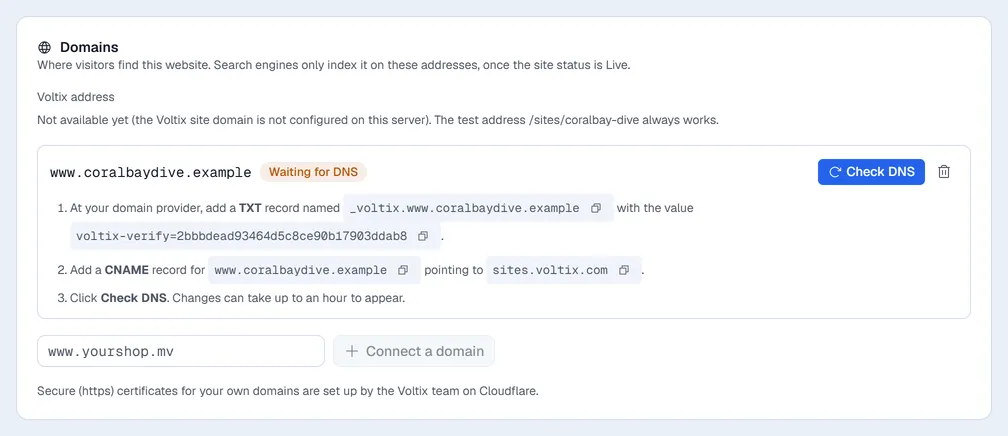
When the check passes, the domain shows Verified and visitors reach the website there within a minute once the CNAME points to Voltix. With more than one domain, click Make main address on the one to use; the others send visitors to it. The bin disconnects a domain.
Analytics
Analytics shows, for 7 days, 30 days, 90 days or 12 months:
- Visitors, Page views and Form messages, with visits per day.
- Top pages, Where visitors come from, Devices and Campaigns (links with utm_source / utm_medium / utm_campaign, for example from social posts or emails).
- With the Websites: orders permission, a Shop section: Orders, Revenue, Average order, Visitors who ordered, revenue per day, best-selling products, payment methods and order status. Shop money is shown in MVR.
Visits are counted without cookies and without personal data, and visitors with Do Not Track are not counted. To stop counting, untick Count visits for Analytics (no cookies, no personal data) in Site settings → General.