CRM at a glance
Follow every possible sale from the first enquiry to the invoice, with stages, activities and reports.
What it is for
CRM keeps track of the sales you are still working on. Each possible sale is an opportunity: who the customer is, what it is worth, how far along it is and what you must do next. New enquiries that are not yet worth following up sit in Leads until you decide to work on them.
Quotations made in the Point of Sale or the Sales app become opportunities on their own, and are marked won when the quotation is turned into an invoice. See Quotations and the pipeline.
CRM works the same whether your company uses Voltix on its own, with SAP or with QuickBooks. Nothing in CRM is sent to SAP or QuickBooks.
Where to find it
On your home page, click CRM. If you do not see it, see Questions and problems.
The screen
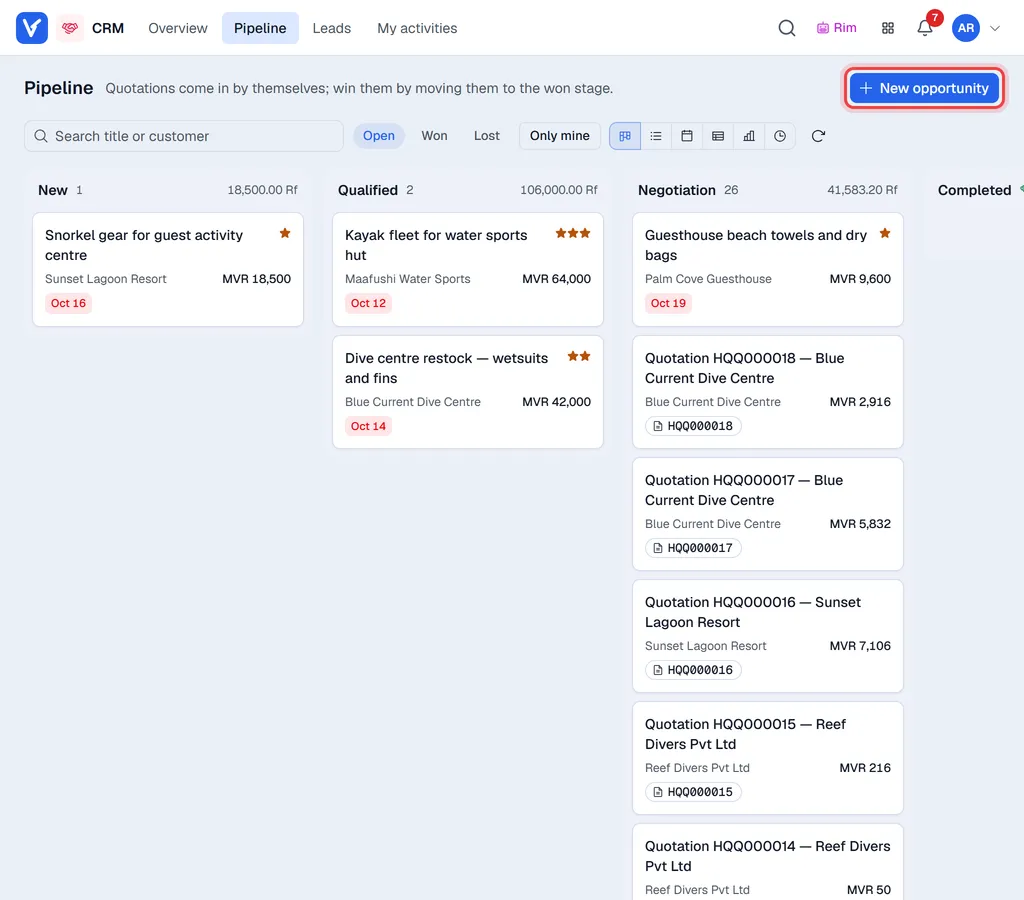
The menus in the top bar:
| Menu | What it shows |
|---|---|
| Overview | Pipeline value, wins, losses and sources for a period. See CRM reports. |
| Pipeline | Your opportunities, by stage. See Work the pipeline. |
| Leads | Enquiries not yet in the pipeline. See Leads. |
| My activities | The calls, meetings and to-dos planned for you. See Activities. |
The customer list is in the Business Partners app (Apps button in the top bar).
Each card shows the title, the customer, the expected revenue, stars for priority and small tags:
| Tag | Meaning |
|---|---|
| Date (green) | The next planned activity, still ahead. |
| Date (amber) | The next activity is due today. |
| Date (red) | The next activity is overdue. |
| Stale | The card has been in this stage longer than the stage allows. |
| Quotation number | The card came from that quotation. |