Document templates
Choose the layout style of each printed document, such as invoices, quotations, sales orders, transfers and payment receipts.
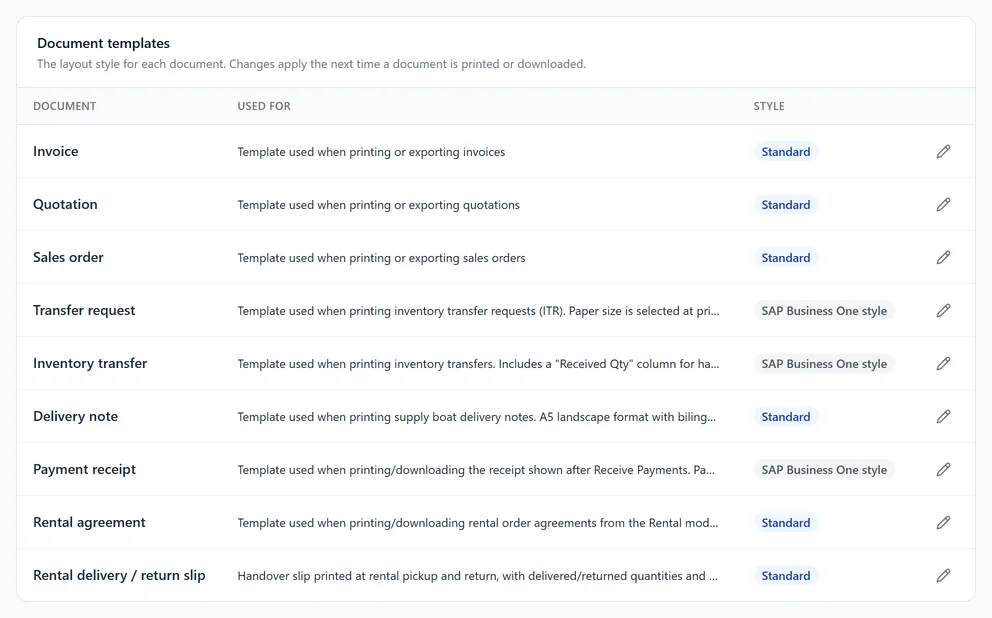
Open Settings → Templates. The Document templates card lists each document, what it is used for, and its current Style.
The styles
| Style | Looks like |
|---|---|
| Standard | A modern layout with a coloured header. |
| SAP Business One style | A classic business format with signature blocks. |
Change a document's style
- 1Click the pencil at the end of the document's row (Change template).
- 2Pick a style. A small preview shows how it looks.
- 3Click Save template.
The new style is used the next time the document is printed or downloaded. Documents already printed do not change.
Documents you can style: Invoice, Quotation, Sales order, Transfer request, Inventory transfer, Delivery note, Payment receipt, Rental agreement and Rental delivery / return slip.
Tip. Your logo and company details come from Company details; a shop's own letterhead and notes from its location in General.