Your company's login address
Give your people their own sign-in address with your logo and name, and send them straight into your company.
What the login address does
Your company can have its own address for signing in to Voltix. On that address the sign-in page shows your logo and says Sign in to your company name. After signing in, people land straight in your company instead of choosing one from a list.
Someone who signs in there but does not belong to your company sees a short message and the usual company list with their own companies. Nobody gets into a company they have not been given.
You can use:
| Address | Example | What you need |
|---|---|---|
| Voltix address | coral-bay.app.voltixerp.com | Nothing: choose the first part and save. |
| Your own address | erp.coralbaytraders.mv | A sub-domain of your own domain and access to its DNS settings. |
Choose your Voltix address
- 1Open Settings → Company.
- 2In the Login address card, type the first part of the address under Voltix address: 3 to 40 lower-case letters, digits or dashes, not starting or ending with a dash.
- 3Click Save.
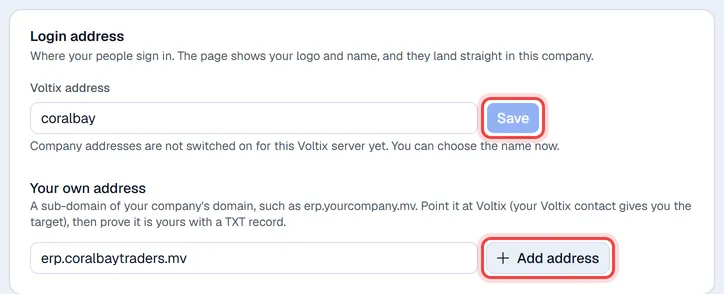
Each address can belong to one company only. If the name is taken or reserved by Voltix, you are told so and nothing changes. The old address stops working as soon as you save a new one, so tell your people.
Use your own address
Use a sub-domain of your domain (for example erp.yourcompany.mv), never the main domain, so your website and e-mail stay where they are.
- 1Ask your Voltix contact which address to point the sub-domain at, and create that record at your DNS provider.
- 2In the Login address card, type the sub-domain under Your own address and click Add address.
- 3Voltix shows a TXT record: a Name (starting with _voltix.) and a Value (starting with voltix-login=). Use the copy buttons and create that TXT record at your DNS provider.
- 4Click Verify. When the record is found, the address shows Verified and works straight away.
An address used to sign in cannot also be used for a website made in the Websites app; use a different sub-domain for each. To stop using an address, click the bin next to it.