Goods receipts (without a purchase order)
Bring stock into a warehouse when there is no purchase order behind it, such as opening stock, found stock, returns from a technician or production output.
Show the steps for
For goods that arrive against a purchase order, use Receive goods in Purchasing instead. This page is about everything else that comes in.
Before you start
You need the Inventory: goods receipt permission; without it Goods receipts does not appear in the Inventory menus.
Make a goods receipt
- 1In Inventory, open Goods receipts and click New goods receipt.
- 2Choose the Receipt type (the reason: opening stock, found stock, return from technician or project, production output, samples received, other) and the To warehouse.
- 3Optionally type a Reference (delivery note, job, batch) and who it was Received from.
- 4Type in the Add an item box and pick the items to add them. Set the quantity and unit on each line, and the cost per unit where the line asks for it (see below).
- 5For batch or serial tracked items, choose the batches or serial numbers under Batch / serial.
- 6Optionally add a Note or files with Attach, then click Post goods receipt. The receipt gets a number (GR-00001, …) and opens, ready to print.
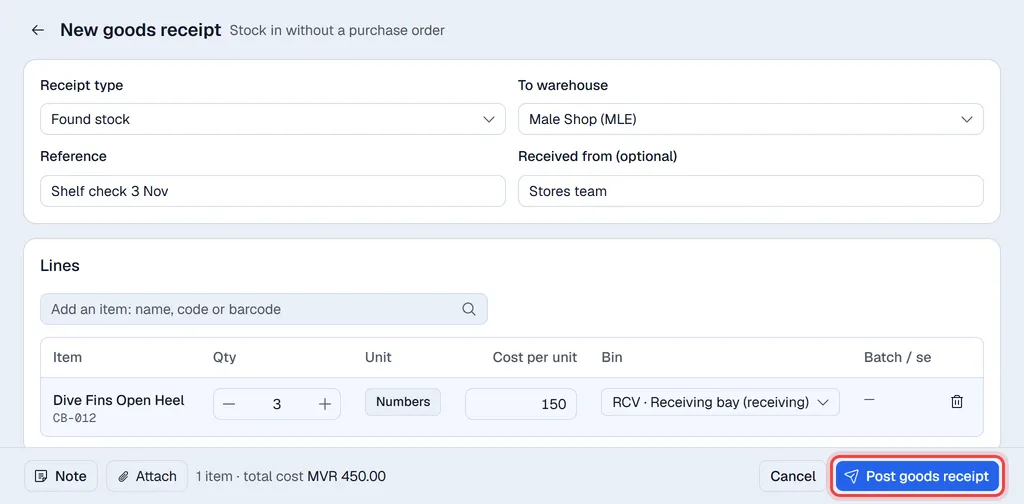
Every line needs a cost per unit (zero is allowed). It moves the item's average cost exactly like a purchase would; the item's last cost is suggested.
The receipt is posted to SAP Business One first as a goods receipt (inventory general entry). If SAP refuses it, nothing is saved in Voltix and you see SAP's message.
Earlier receipts
Goods receipts lists every receipt with its number, type, warehouse, reference, item count, who made it, the date and the status. Click a row to open it, then Print, Download or Send it. Under … you find Duplicate (a new receipt with the same lines) and Print labels for the received items; the Attachments tab holds its files.
Reverse a receipt
Open the receipt and choose … → Reverse receipt to take the stock back out. Voltix makes a goods issue of the same lines, typed Reversal of a goods receipt, and marks the receipt Reversed. A receipt can only be reversed once.
Settings
Settings → Inventory → Document types holds the receipt types and the goods issue types. Rename them, switch them off or add your own.
On a company that runs on SAP the types are the ones synced from SAP and are edited there.