Taking items back
Record returns, all at once or a few items at a time. Late returns are flagged and charged a late fee.
- 1Open the rental (filter Out) and click Return.
- 2In Back now, enter how many of each item came back. Voltix fills in everything still out.
- 3When a deposit is held, leave Deposit to give back at 0 if the deposit will be set against the invoice. Enter an amount only if you are giving money back now. The deposit is given back on the final return (when the last item is back), and only from an open register, like taking a deposit: without one the dialog says No register is open. Open a register on a POS terminal, then give the deposit back. The refund then shows in that register's report.
- 4Click Confirm return.
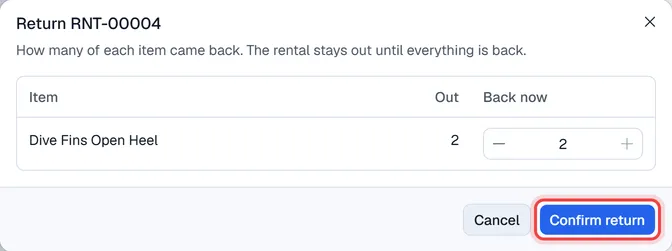
While items are still out, the rental stays Picked up; when the last item is back it becomes Returned. The Out / back column of the lines shows how many went out and came back. Use … → Print return slip to print what came back.
Late returns
A rental whose return time has passed shows Late return in red. On the final return Voltix works out the late fee from Settings → Rental: after the grace period, full days at the day rate and the remaining hours at the hour rate. You can check and change the late fee when you create the invoice.
Deposits
The deposit is held until the rental is invoiced, so it can be set against the bill. See Invoicing a rental. Taking a deposit, collecting an invoice payment and giving a deposit back all need an open register; a return without a refund does not.