Reserve and hand over
Reserve a quotation and take the deposit, then record the pickup when the customer collects the items.
Reserve
- 1In Rentals, pick the Quotations filter and click the rental.
- 2Click Reserve.
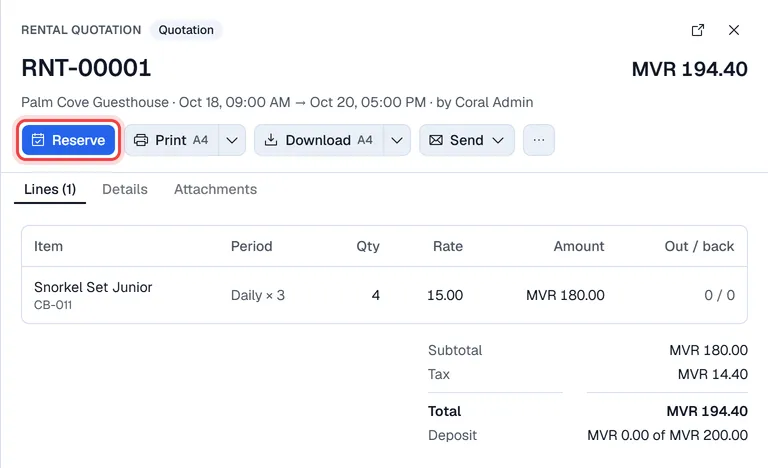
If the rental has a deposit, the Collect deposit window opens:
- 1Check the Deposit amount.
- 2Pick the payment method. Use Split payment to take it in more than one way (for example part cash, part card), with an optional reference.
- 3Click Take … and reserve.
Afterwards Voltix offers Print deposit receipt for the customer.
Tip. If the terminal has an account (credit) payment method, you can tick Credit rental: no deposit, billed on payment terms, pick the terms and click Reserve on credit.
If there are not enough free units, Voltix lists the shortage and asks whether to reserve anyway.
Pickup
When the customer collects the items:
- 1Open the rental (filter Reserved) and click Pick up.
- 2In Pick up now, check the quantity of each line. Lower it if the customer takes only part now.
- 3Click Confirm pickup.
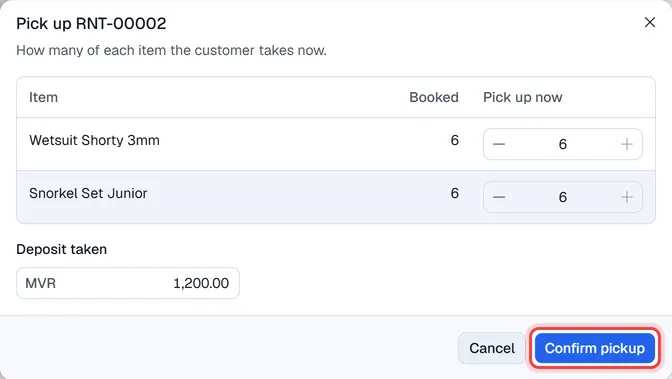
After the pickup, … → Print pickup slip prints what was handed over. Print and Download give the rental agreement at any stage (the arrow next to them picks A4 or A5); Send → By e-mail sends it to the customer.
Cancel
A quotation or a reserved rental can be cancelled with … → Cancel rental. After pickup it can no longer be cancelled.