Plans and activities
Build checklists such as Onboarding and Offboarding once, then launch them on an employee to create dated to-dos for the manager, HR and the employee.
Create a plan
- 1Go to Settings → Employees → Plans and click New plan.
- 2Enter a Plan name, for example "Onboarding". If it is for one department only, choose the Department.
- 3Under Activities to create, fill each line: what to do, who it is for (Manager, Employee or HR responsible), a number of days, and days before plan date or days after plan date. Click Add a line for more.
- 4Click Save plan.
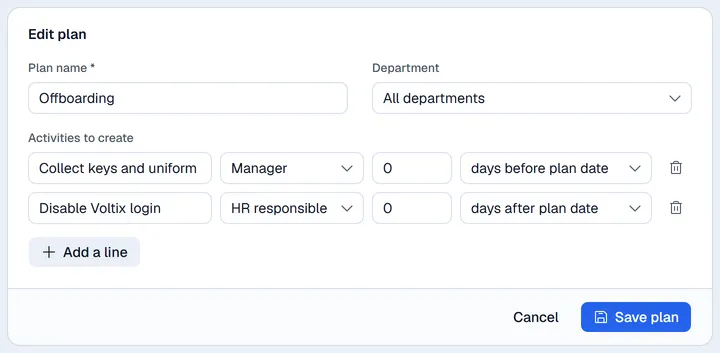
Deleting a plan does not remove to-dos already created from it.
Launch a plan on an employee
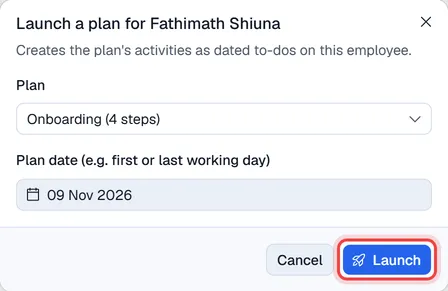
- 1Open the employee and click Launch plan (at the top, or on the Activities tab).
- 2Choose the Plan.
- 3Set the Plan date, usually the first or the last working day.
- 4Click Launch.
Each line becomes a to-do with a due date. For example, "3 days before plan date" with a plan date of 12 October is due on 9 October. A step for Manager is labelled with the person's manager, a step for HR responsible with their HR responsible (set with Edit, under Login and HR).
Work through the to-dos
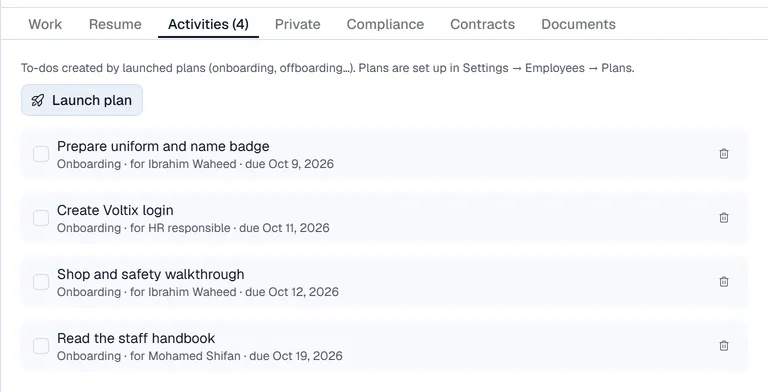
On the Activities tab, tick a to-do when it is done (tick again to reopen it), or use the bin to remove it. The number next to Activities is how many are still open.