Returns and credit memos
Take goods back against an invoice and refund or credit the customer.
Show the steps for
Which kind of return your company uses
An administrator chooses one in Settings → Sales → Rules (the Returns setting):
| Setting | What a return creates |
|---|---|
| Return against the invoice | A return invoice with negative amounts, the same as a return at the Point of Sale. |
| Credit memo | A credit memo linked to the original invoice. |
You need the Sales: create invoices permission to take a return.
Take a return
- 1Open the invoice from Sales → Invoices.
- 2Click Return (the button is called Credit memo when your company uses credit memos).
- 3For each line you see what was invoiced and already returned. In Return now, set the quantity coming back with − and + or by typing it. You cannot return more than is left.
- 4Enter the Reason.
- 5If money goes back to the customer, pick how in Refund … by (cash, bank transfer…). For a bank transfer, enter the Transfer reference.
- 6Click Post return (or Create credit memo) and confirm.
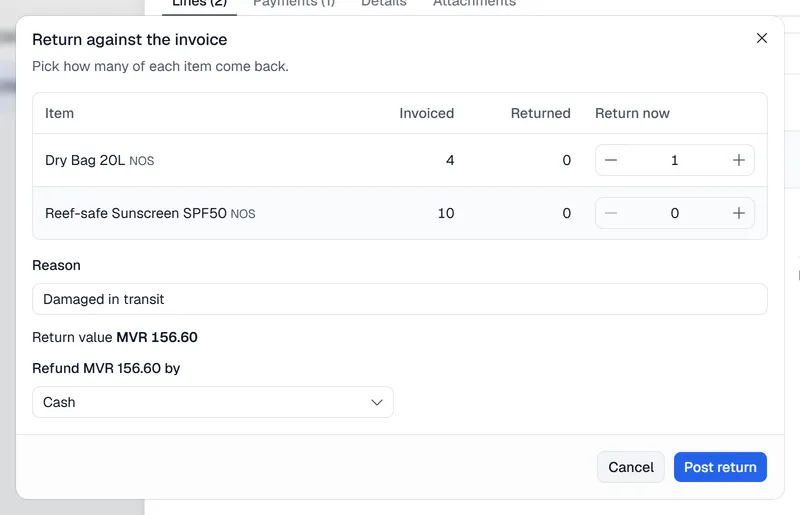
The return is listed under Sales → Returns (or Credit memos), and the invoice's chain at the top shows it. On a return, the Original invoice chip, or Open the original invoice under its lines, takes you back to the invoice.
Refund or credit?
- Return against the invoice. If the original invoice was paid, the full return is refunded. If it was on credit and still open, nothing is refunded; the return is credited to the customer's account.
- Credit memo. The credit memo first reduces what the customer still owes on that invoice. Only the part above that is refunded.
In SAP Business One
- Return against the invoice is posted to SAP the same way as a return at the Point of Sale.
- Credit memo posts an A/R credit memo to SAP based on the original invoice lines, so SAP applies it to the invoice. A refund is posted as an outgoing payment against the credit memo.
As with invoices, if SAP refuses the return, nothing is saved and SAP's message is shown.
In Voltix
Both kinds are saved in Voltix. With the Finance app, a return creates the reverse journal entries automatically (sales returns and tax against receivables), and a refund creates its own payment entry.
With QuickBooks
Returns and credit memos are kept in Voltix only; they are not sent to QuickBooks. Record the matching credit in QuickBooks if you need it there.