Document numbering
How company-wide documents such as purchase orders, business partners, items and banking vouchers are numbered.
Show the steps for
Open Settings → Document numbering. The Number series card lists one series per document type.
Note. Invoice and receipt numbers are not set here: each Point of Sale terminal has its own (see Setting up the Point of Sale), and so does each Sales profile (see Setting up Sales). Other apps, such as Finance or Helpdesk, number their documents in their own settings.
Change a series
- 1Click the pencil at the end of the row.
- 2Change: - Prefix: the letters in front, for example PO. - Next number: the number the next document gets. - Format: how the number is built. Use
{PREFIX},{YYYY}(year),{MM}(month) and{#####}for the zero-padded number, for example{PREFIX}{#####}. - 3Check Next document, which shows what the next number will look like.
- 4Click Save.
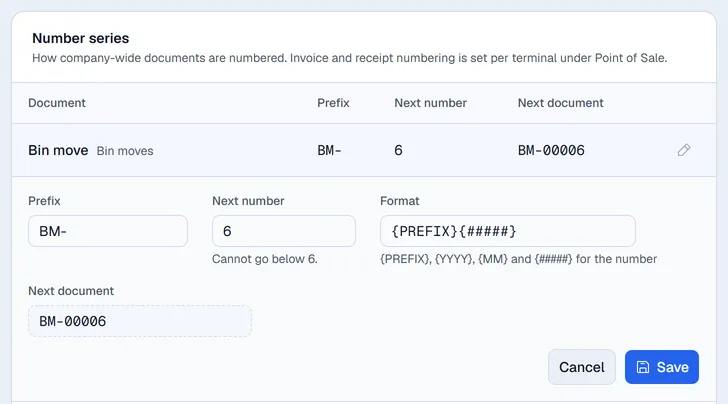
Important. The next number can only go up. A lower number would hand out numbers that were already used, so Voltix refuses it and the field shows the lowest number allowed.
Note. While SAP Business One is connected, SAP numbers business partners, items and purchase orders, so those series cannot be changed here.