Couriers, outside people and proof of delivery
Hand an item to a courier, driver or visitor with their signature on the screen, send outgoing mail and keep proof of delivery.
These steps need Mailroom: log items (reception).
Hand an item to someone outside Voltix
Use this when the person taking the item does not use Voltix: a courier, a driver, a visitor collecting a parcel.
- 1Open the item and press Hand to someone outside (on an outgoing item: Hand to courier).
- 2Fill in Name (required), Phone, Company and, if you want, ID number.
- 3Let them sign in the Signature box with a finger, a mouse or a pen. Clear starts again.
- 4Instead of (or as well as) a signature, attach a photo or PDF of a paper they signed under Signed paper.
- 5Add a Photo if you want, for example of the person or the vehicle.
- 6Press Hand over.
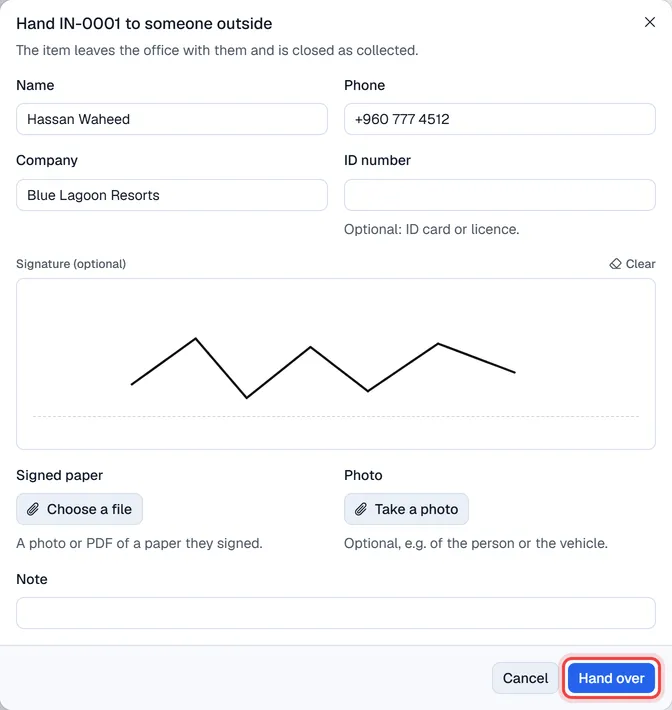
It happens in one step; there is nothing to accept:
- an incoming or internal item leaves the office and is closed as Collected;
- an outgoing item is sent, with the courier and tracking number you fill in.
The signature, signed paper and photo stay on the item for good under Signatures, photos and files. They cannot be removed.
Important. When your company switches on Signature required from people outside Voltix (Settings → Mailroom → General), an item cannot leave with an outside person without a signature or a signed paper.
Send outgoing mail
- 1The person sending something logs it as Outgoing and hands it to reception, who accepts it.
- 2Reception presses Mark sent, picks the Courier and types the Tracking number. Or uses Hand to courier to keep the courier's signature.
- 3When it arrives, reception presses Mark delivered. Attach the signed delivery note under Proof of delivery if you have one.
The person who logged the item is told when it is sent and when it is delivered.
Tracking links
When a courier in Settings → Mailroom → Couriers has a tracking link, the item shows Track next to the tracking number. It opens the courier's own tracking page. Voltix does not contact the courier itself.