Record a vendor bill (AP invoice)
An AP invoice records a vendor's bill and what you owe them, with tax. Use an Item invoice for goods from your catalogue, and a Service invoice for freight, repairs, rent and other costs that go to an expense account.
Show the steps for
Item or service
When you click New AP invoice, first choose the Invoice type:
| Invoice type | Use it for | Lines |
|---|---|---|
| Item | Goods from your product catalogue. | Products with quantity, unit, warehouse, tax code and price. |
| Service | Costs that are not stock: freight, repairs, electricity, rent, fees. | A description, a G/L account, a tax code and an amount. |
From a goods receipt
When the goods came in on a goods receipt, copy the invoice from it. The invoice then belongs to that receipt and its purchase order, and the same goods cannot be invoiced twice.
- 1Open the goods receipt in Purchasing → Goods receipts, click the … button and choose Copy to AP invoice. Or, on a new AP invoice, click Copy from goods receipt and pick the receipt.
- 2The vendor, currency and lines are filled in with what is not invoiced yet. Lower a quantity if the bill covers only part of the delivery.
- 3Enter the Vendor ref. no., check the prices against the bill and click Post invoice.
Voltix refuses an invoice that would bill more than was received on a line, and says how much is left. A draft invoice also counts as invoiced until it is deleted.
At the top of every purchase order, goods receipt and AP invoice, the document family shows the chain: Purchase order → Goods receipt → AP invoice. Click a document in it to open it.
In SAP Business One the invoice is linked to the goods receipt as its base document, like Copy From → Goods Receipt PO in SAP.
An item invoice
- 1Open Purchasing → AP invoices and click New AP invoice. Invoice type is Item.
- 2Pick the vendor with Pick a vendor
- 3Enter the Document date (the date on the bill), the Due date and, in Vendor ref. no., the vendor's invoice number.
- 4Add the products from the search on the right and set Quantity, Unit, warehouse and Unit price as on the bill.
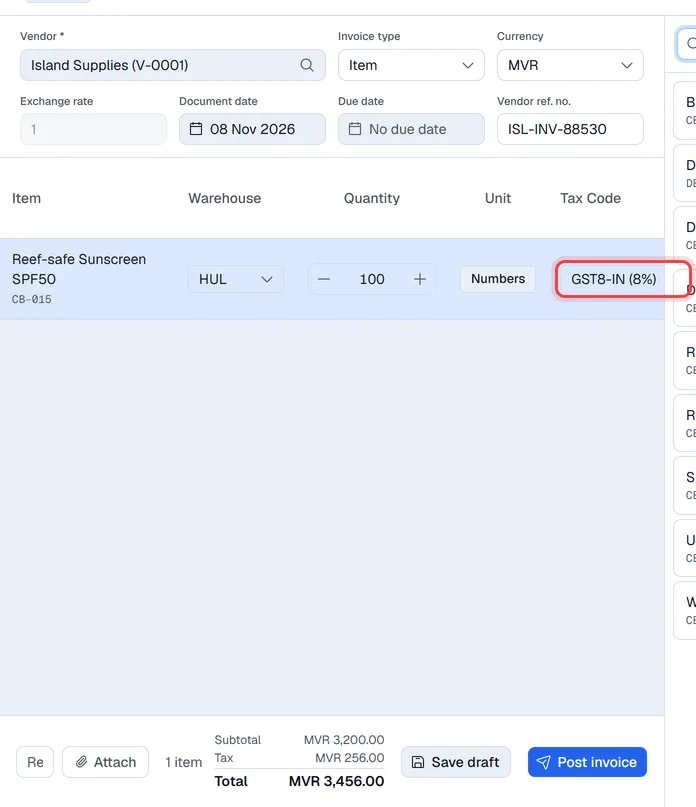
- 5Check the Tax Code of each line.
- 6Check the Subtotal, Tax and Total at the bottom against the vendor's bill, and click Post invoice.
Tax codes
Each line starts with the item's own purchase tax code. Items without one get the Default AP invoice tax code from Settings → Purchasing. You can change the code on any line; None means no tax. The Tax total at the bottom is worked out from the codes on the lines.
The Tax total shown in Voltix is an estimate. SAP Business One works out the final tax when the invoice is posted, and SAP's figure is the one in your books.
A service invoice
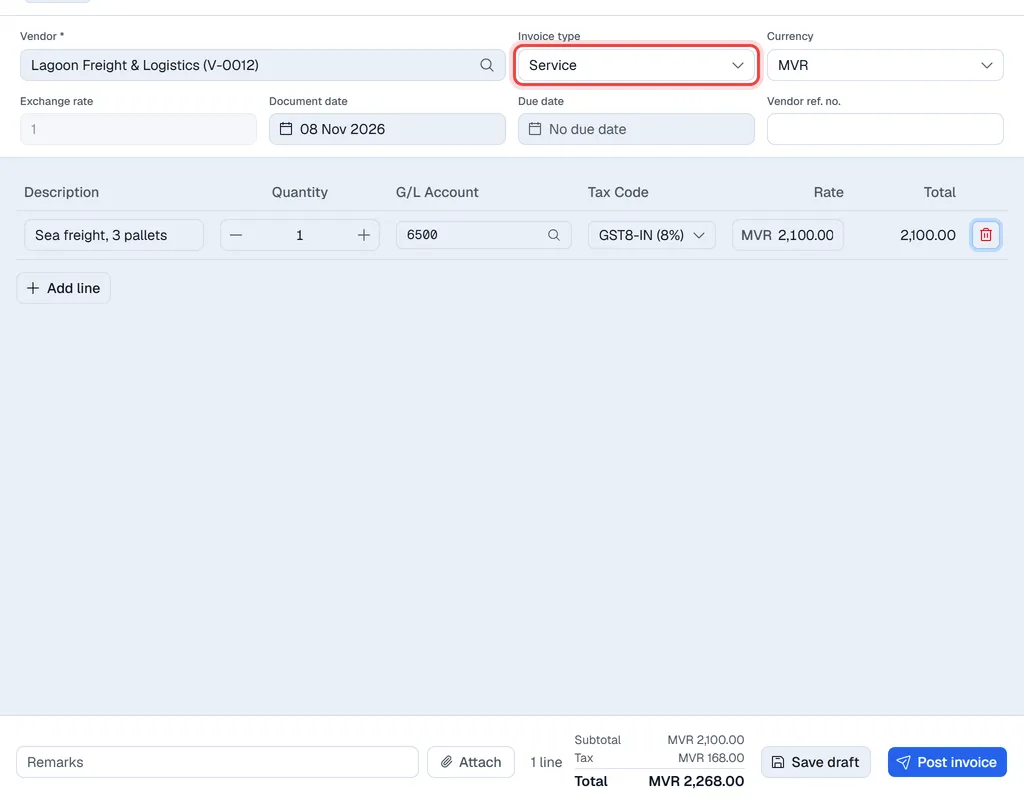
- 1Click New AP invoice and set Invoice type to Service. The product search disappears.
- 2Pick the vendor and fill in the dates and Vendor ref. no. as above.
- 3Click Add line and fill it in: - Description, for example Sea freight, 3 pallets. - G/L Account: type at least two characters of the account code or name and pick the account from the list, for example 6500 Transport and Fuel. - Tax code and Rate (the amount). Quantity is 1 unless the bill shows a quantity.
- 4Add a line for each cost on the bill and click Post invoice.
What happens when you post
The invoice is sent to SAP Business One first and gets its SAP number in the SAP number column. If SAP refuses it, nothing is saved and you see SAP's message. If your SAP company has an approval procedure for A/P invoices, see Approvals.
The invoice is saved with the next AP invoice number and is open for payment until it is paid: see Paying vendors. With the Finance app and automatic postings switched on, its journal entry is created straight away: each line's expense account and the input tax account are debited, and the vendor's payable account is credited with the total. The accounts come from Settings → Finance.
The invoice is saved in Voltix with the next AP invoice number. It is not sent to QuickBooks.
Foreign-currency bills
Pick the vendor's currency in Currency. The Exchange rate is filled in from your company's rates for that currency; change it if the bill uses another rate. Amounts on the invoice stay in the bill's currency.