Rules
Teach Banking to recognise statement lines that come back every month, so Categorize opens already filled in.
For companies without sap or with sap business one.
What a rule does
A rule looks at statement lines. When a line fits, it is tagged with the rule's name and Categorize opens filled in with the rule's account, customer or vendor. Nothing is posted until you check it and click Post.
Rules run on every import, and on demand with Run rules on a statement.
Create a rule
- 1Open Banking → Rules and click New Rule.
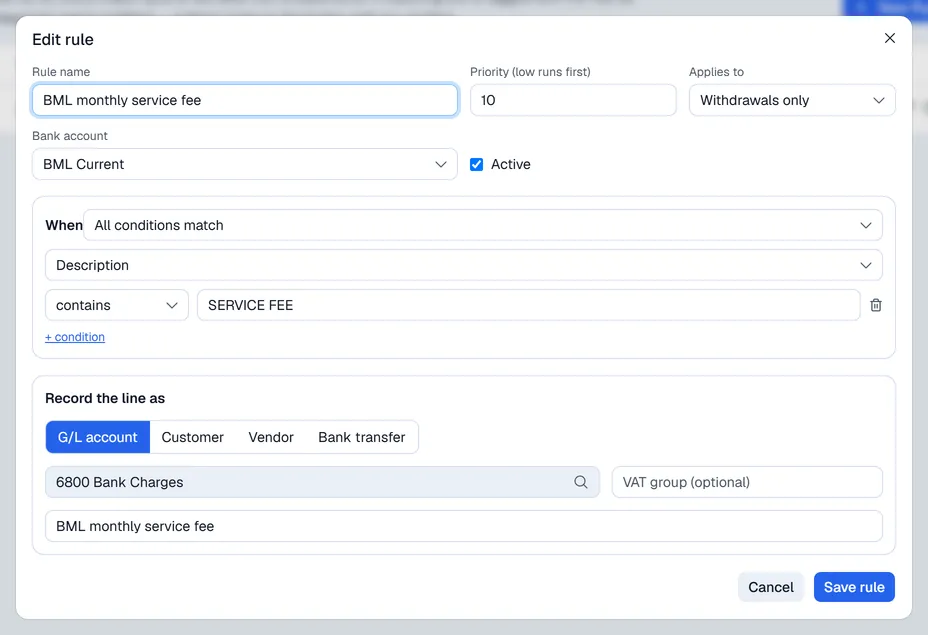
- 2Give it a Rule name and a Priority (lower numbers run first).
- 3Choose what it Applies to (deposits, withdrawals or both) and the Bank account (one, or all).
- 4Under When, add conditions on the Description, Reference or Amount, for example "Description contains SERVICE FEE". Choose All conditions match or Any condition matches.
- 5Under Record the line as, choose G/L account, Customer, Vendor or Bank transfer (a move to another of your bank accounts) and fill it in.
- 6Click Save rule.
An amount condition ignores the sign, so 45.00 matches a withdrawal of -45.00.
Deleting a rule stops it recognising new lines; lines already tagged keep their tag.