Websites at a glance
Build your company's website inside Voltix, with your own products, prices and stock, an online shop, a blog, forms and live chat.
What the Websites app does
The Websites app builds fast, search-friendly websites from your Voltix data. You design pages with ready-made blocks, show your products with the prices and stock you already keep in Voltix, and can take orders online. Messages from the website arrive in the Helpdesk and CRM.
Open Websites from your home page. When your company has one website, it opens straight away; Sites in the menu at the top shows all of them, one card per website, with its status (In progress, Live or Switched off), its address and the number of pages.
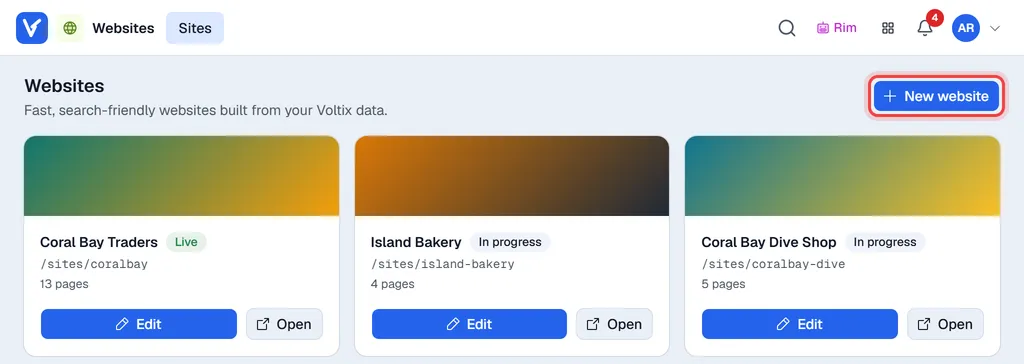
- Edit opens the website's workspace.
- Open shows the website in a new browser tab.
- New website starts the wizard (see Create a website).
The workspace
Inside a website, the menus in the bar at the top are (on a phone they fold into Menu):
| Menu | What you do there |
|---|---|
| Sites | Back to the list of websites. |
| Pages | Add, edit, translate, copy and delete pages. |
| Blog | Blog posts and recipes. |
| Catalogue | Choose which products appear on the website, and how. |
| Shop → Orders, Customers, Shop settings | Online orders, signed-in customers and the shop settings. |
| Forms | Messages sent through the website's contact forms. |
| Analytics | Visits, top pages and shop figures. |
| Site settings → Menus | The main menu and the footer links. |
| Site settings → Images | The picture library shared by all your websites. |
| Site settings → Theme | Colours, fonts, buttons, header and footer. |
| Site settings → SEO | A report of search-engine problems across the pages. |
| Site settings → General | Domains, status, business details, live chat and languages. |
| Site settings → Redirects | Send old addresses to current pages. |
Open website (top right) shows the website in a new browser tab.
The test address
A new website lives on a test address: /sites/ followed by its address name (for example /sites/coralbay-dive). The test address is hidden from search engines. When you are ready, the website gets its own Voltix address and, if you want, your own domain. See Domains and analytics.
Who can do what
The Websites app is for managers and administrators. An administrator turns on these permissions per auth group in Settings → Authorization (administrators have them all):
| Permission | Allows |
|---|---|
| Websites: edit | Edit pages, menus, images, redirects and form messages (drafts only). |
| Websites: publish | Publish and unpublish pages, restore earlier versions, and put products on or off the website. |
| Websites: settings | Create and delete websites; change the theme, address, site settings and shop settings. |
| Websites: orders | See and handle online shop orders and signed-in shop customers. Shop figures in Analytics also need it. |