POS reports
The shift figures for any period and terminal, and the session and daily shift reports for managers.
Click Reporting in the bar at the top.
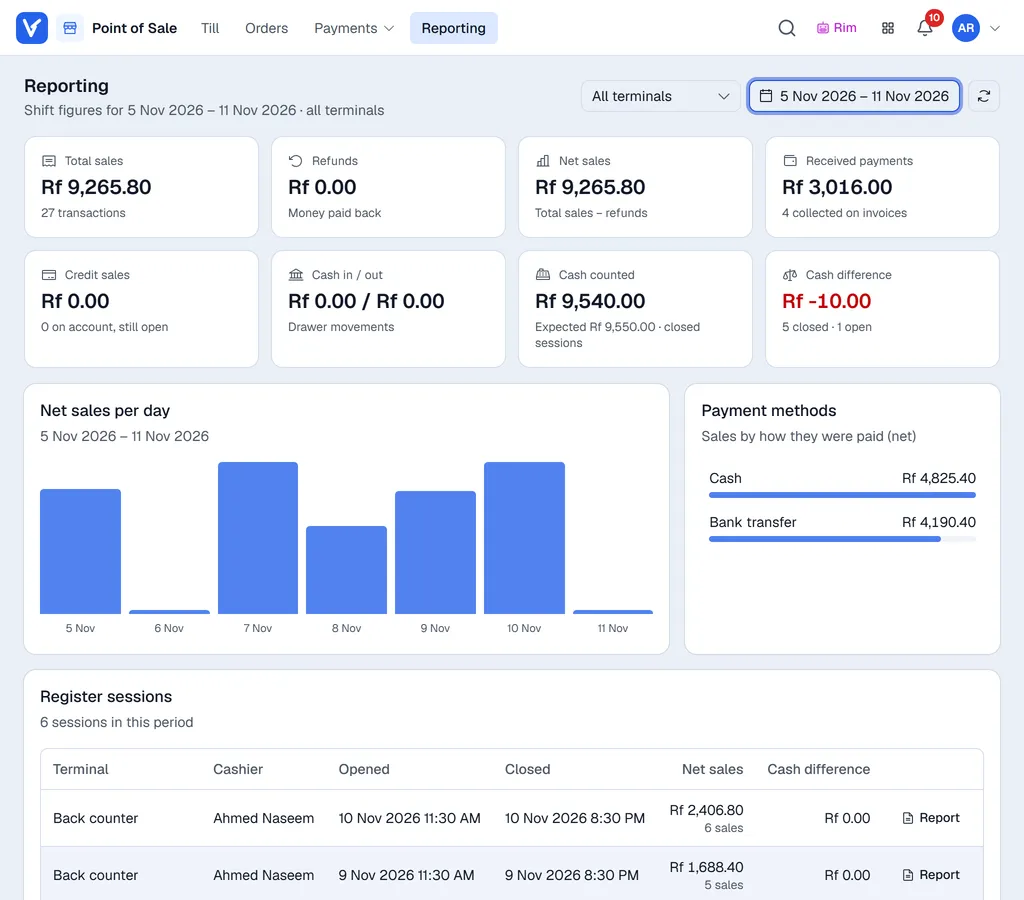
Shift figures
Pick the days with the date box at the top right (today to start with; Last 7 days, This month and more are one click away) and, for one till only, the terminal next to it. The cards add up the register sessions of those days, the same way the session and daily reports count: Total sales, Refunds, Net sales, Received payments, Credit sales (on account, still open), Cash in / out, Cash counted (with what was expected) and Cash difference (red when cash is short).
A session belongs to the day it closed (a register still open counts on the day it opened). Under the cards: Net sales per day, the Payment methods, and the Register sessions themselves; managers can print a closed session's report from its Report button.
Shift reports
Managers and administrators also see Shift reports. Click the report you want:
| Report | What it gives you |
|---|---|
| Daily consolidated shift-end report | All closed register sessions for one day, across every terminal or for one location. |
| Session report | One terminal's end-of-day session report for a chosen day. Use it to reprint a closing report. |
| Detailed payment report | Every payment line behind each payment method for a period, filtered by location, terminal and payment method. Use it to trace a difference down to the invoice. |
In each dialog, choose the day or period (and terminal or location), then click Download PDF, or More for Preview PDF, Excel (.xlsx), CSV and Print.
For the Session report, Revised PDF builds the report again from the current figures instead of the copy saved when the register closed; it is marked REVISED.
How the money is counted
The session and daily reports use the same rules:
| Figure | Meaning |
|---|---|
| Total Sales | All money received: every payment taken in the session. |
| Refunds | Money paid back to customers on returns and exchanges. |
| Net Sales | Total Sales minus Refunds. |
Cancelled and voided invoices are left out. Expected cash = opening cash + cash payments + cash in − cash out. See Cash in and out, and closing.