Rim in Sales
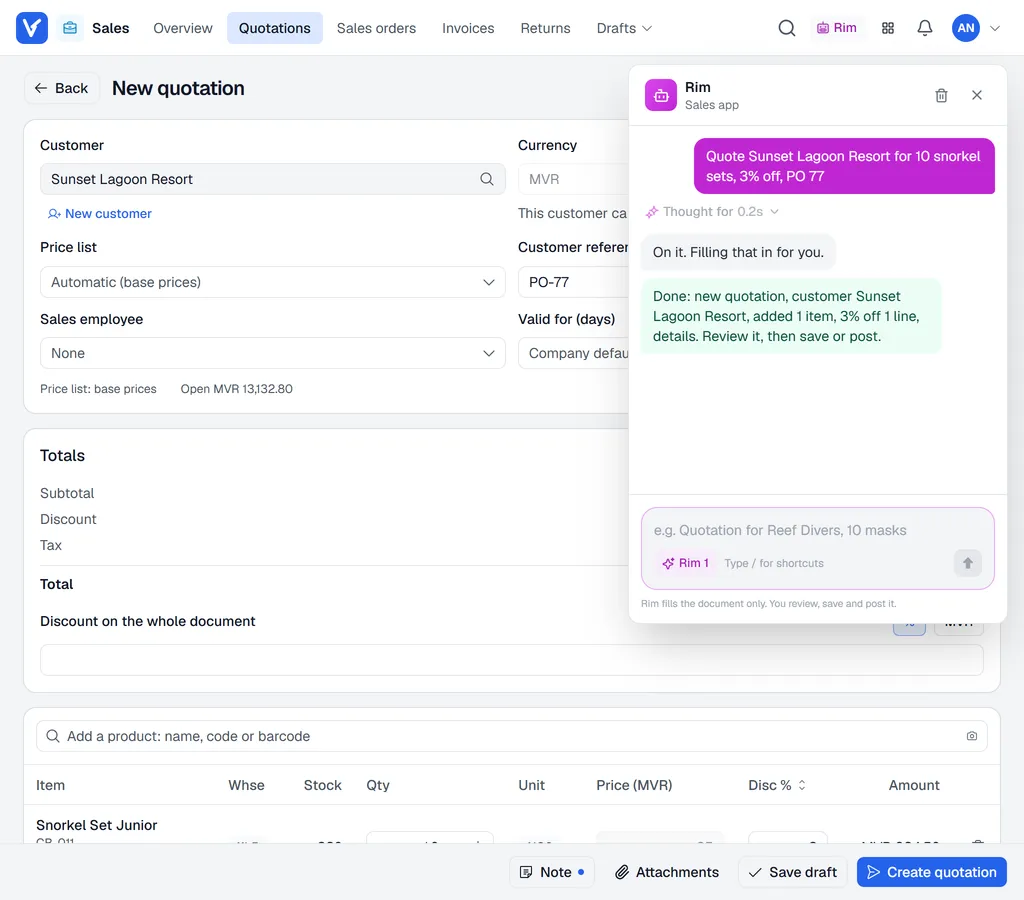
Rim, the Voltix assistant, can fill quotations, sales orders and invoices for you from a sentence. You check the document and create it yourself.
Note. Rim is available when your company has it switched on. Look for the Rim button in the bar at the top of the screen, next to the search.
Ask Rim to prepare a document
- 1In Sales, click Rim in the bar at the top. The chat opens under the bar; click Rim again to close it.
- 2Type what you need in your own words, for example: - Quote Reef Divers 10 dive masks and 5 towels, 5% off the masks - Make a sales order for Coral Resort: 20 snorkel sets, PO 4471 - Add 2 more towels and give 10% off the whole document
- 3Rim looks up the customer and products. If something is unclear (two customers with similar names, a product it cannot find), it asks you first.
- 4When everything is clear, Rim fills the document in the Sales editor in front of you, using the normal prices, units, special prices and your discount limit.
- 5Check the document and click Create quotation, Create sales order or Post invoice yourself.
What Rim can and cannot do
| Rim can | Rim never |
|---|---|
| Start a quotation, sales order or invoice | Create, post or approve a document |
| Set the customer, currency, reference (PO), notes and sales employee | Send an e-mail |
| Add, change and remove lines, units and warehouses | Take a payment |
| Give line and document discounts within your limit | Go above your discount limit without approval |
| Open a created document, or start a sales order or invoice from it | Change prices unless you are allowed to |
| Answer price and stock questions |
Tip. If you already have a document open with unsaved changes and ask Rim for a new one, Rim saves your work as a draft first.