Financial reports
Trial balance, general ledger, profit and loss, balance sheet, tax report and aged receivables and payables, with print, PDF and Excel.
For companies without sap.
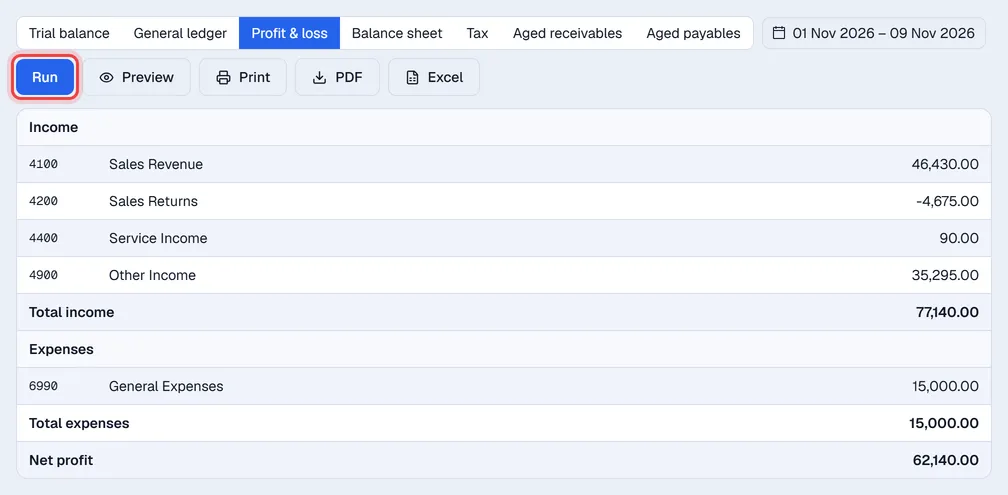
Open Finance → Reports, pick a report, set the dates and click Run. Then Print, save a PDF or download Excel.
| Report | Shows |
|---|---|
| Trial balance | Every account with activity: opening, debits, credits and closing balance for the dates. |
| General ledger | Every line on one account with a running balance. Pick the account first, or click an account in the chart to jump here. |
| Profit & loss | Income and expenses for the dates, and the net profit or loss. Year-end closing entries are left out. |
| Balance sheet | Assets, liabilities and equity on a date. Equity includes the current earnings not yet closed. |
| Tax | Output tax on sales and input tax on purchases per tax group, and the net payable. |
| Aged receivables | Open customer invoices by days since the invoice date: 0–30, 31–60, 61–90 and over 90. |
| Aged payables | Open purchase invoices by days past due. |
Reports count posted entries only; drafts are left out. All amounts are in MVR.
Tip. The Receivables and Payables cards on the Overview open the aged reports directly.