Approvals
Your company can ask for a manager's approval before a purchase order or a goods receipt is created. Here is how a document waits, and how a manager approves or rejects it.
Show the steps for
When a document needs approval
An administrator decides this in Settings → Purchasing → Approvals (see Setting up Purchasing). When approval is required:
- The form shows Approval required before posting to SAP under its title (the same text appears for companies without SAP).
- The main button says Submit for approval instead of Create purchase order or Post receipt.
- After you submit, the document gets its number and the status Waiting for approval.
A document waiting for approval does not count yet: a pending goods receipt does not add stock and does not count as received on the purchase order.
Approve or reject
Approving and rejecting is for users with the manager or admin role.
- 1Open Purchasing and pick Purchase orders or Goods receipts in the bar at the top.
- 2Click Waiting for approval above the list to see only what is waiting.
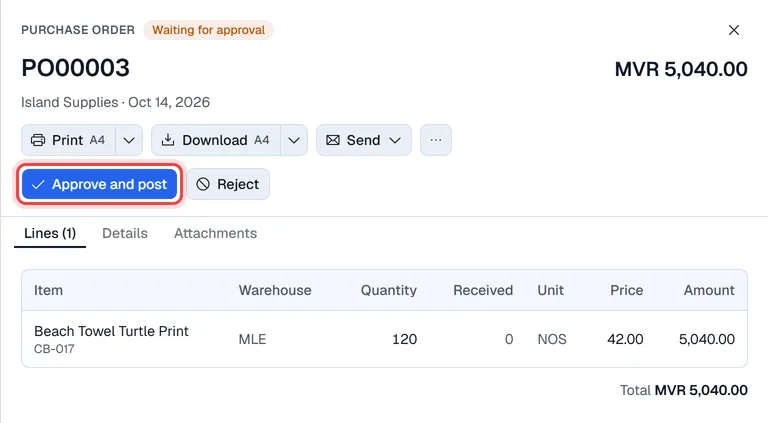
- 3Click the document. It opens in a panel on the right: check the vendor, the lines and the total.
- 4Click Approve and post, or click Reject, type a reason (optional) and click Reject again.
| Decision | What happens |
|---|---|
| Approve and post | A purchase order becomes Open; a goods receipt becomes Posted, adds its stock and counts as received on its purchase order. |
| Reject | The document becomes Rejected. The reason is shown at the top of the document. A rejected document cannot be changed: create a new one. |
Approving sends the document to SAP Business One. If SAP refuses it, the document stays Waiting for approval and the SAP message is shown on it, so it can be corrected and approved again.
SAP's own approval procedure for AP invoices
If your SAP company has an approval procedure for A/P invoices, and AP invoices go through a SAP approval procedure is switched on in Settings → Purchasing, a posted AP invoice first goes to SAP's approver. The invoice is only in your books once it has been approved in SAP.